Free · Colour
Starter LUT Pack for the Osmo Pocket
Two conversion LUTs (D-Log and D-Log 2) plus three looks for DJI Osmo Pocket 4P and Pocket 4 footage. Works in Resolve, Premiere and Final Cut.
3 LUTsD-LogEmail to download
Free · Workflow
Project folder template for Post Haste
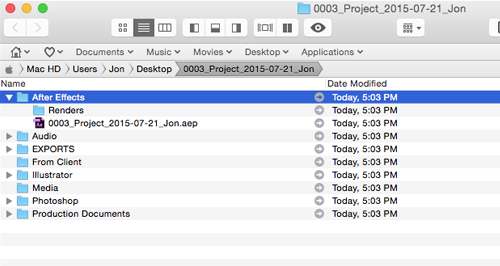
The folder structure I start every video and photo job with, ready to import into Post Haste, the free tool from Digital Rebellion that builds your project folders in one click. Ready-made templates for YouTube, Reels, client work, personal projects and photography: footage, music, assets and exports always in the same place.
Mac & WindowsPost Haste is freeEmail to download
How it works
Set up a project in ten seconds.
- 01Install Post HasteDownload the free app from Digital Rebellion. It runs on macOS 10.9 or newer and on Windows 10 or newer.
- 02Import my templateUnzip the download, then double-click a .pht template or drag it onto Post Haste. It appears in your Templates list, where you can open it and see every folder inside.
- 03Create a projectEnter the project name, pick where it lives, and your whole folder structure appears in seconds.
Check your inbox.
Your template is on its way. If you don't see it, check spam or promotions.
Quick questions.
What is Post Haste?A free project-management tool from Digital Rebellion. You define a folder and file structure once, then it builds that structure for every new project and fills in names from parameters like project name, client and date.
Does it work on Mac and Windows?Yes. Post Haste is available for macOS and Windows.
Can I edit the template?Yes. Post Haste lets you add, rename and remove folders, so make it fit your own workflow.
Why is it free?It is the setup I use myself and want other creators to have. If it saves you time, a share or a subscribe to the channel is a great thank-you.